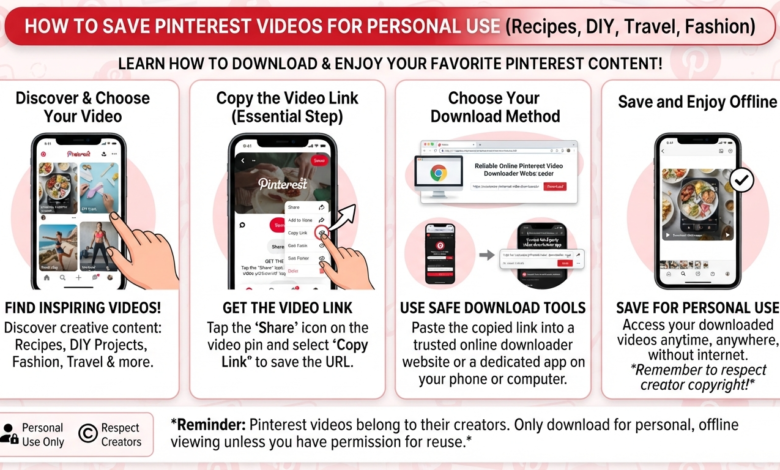
Pinterest is full of useful and creative video content. You can find recipes, fashion ideas, DIY projects, travel clips, workouts, home designs, and much more. Sometimes, you may want to save a useful video for later. This is where learning how to download Pinterest videos can help. Pinterest does not provide a direct download option for every video. However, there are simple ways to save content for personal use. You can use your phone, computer, or a trusted online downloader. The process is usually quick when you have the correct Pinterest video link. Before saving any video, remember that creators own their content. Download videos for personal use unless you have permission to reuse them. This guide explains several safe and simple methods. You will also learn how to copy a Pinterest video link and save it correctly.
What Does Downloading a Pinterest Video Mean?
Learning how to download Pinterest videos means saving a video from Pinterest to your device. The saved file can usually be watched without opening Pinterest. Depending on the method, the video may be stored as an MP4 file. This makes it easier to watch later when you have limited internet access. It can also help you keep a useful personal reference. For example, you might save a cooking tutorial for your kitchen. You could also save a workout demonstration for personal viewing. However, downloading does not give you ownership of the video. The original creator may have copyright protection. You should avoid reposting, selling, or editing someone else’s work without permission. Always check the creator’s usage rules before using downloaded content publicly.
How to Download Pinterest Videos Using an Online Tool
One common method for how to download Pinterest videos uses an online Pinterest video downloader. First, open Pinterest and find the video you want. Open the Pin and select the share option. Choose the option that lets you copy the link. Next, open a reputable downloader website in your browser. Paste the Pinterest URL into the provided box. The website may then process the video and provide a download button. Select the available video quality and save the file. Avoid websites that ask for unnecessary personal information. You should also be careful with aggressive pop-ups and suspicious download buttons. A trustworthy service should have a simple interface. Always check the downloaded file before opening it. This basic process works on many phones, tablets, and computers.
How to Download Pinterest Videos on Android
If you use Android, how to download Pinterest videos can be completed directly through your browser. Start by opening the Pinterest app. Find the video you want to save. Tap the share icon and copy the Pin’s link. Then open your preferred mobile browser. Visit a trusted Pinterest video downloading service. Paste the copied link into its search or download box. Follow the instructions shown on the page. If a video download option appears, select it. The file should normally appear inside your Downloads folder. You may then open it through your phone’s gallery or file manager. Do not install unknown APK files just to download a video. Browser-based tools are often simpler. Always keep your Android security features enabled when visiting unfamiliar websites.
How to Download Pinterest Videos on iPhone
Many iPhone users also search for how to download Pinterest videos without installing complicated applications. The process begins by opening Pinterest. Find the video and tap the share button. Select the option for copying the Pin link. Open Safari and visit a reliable online Pinterest downloader. Paste the link into the appropriate field. Follow the download instructions provided by the website. Depending on your iOS version and browser settings, the file may appear in the Files app. You can then move or organize it as needed. Some websites may not work correctly on every iPhone. If one service fails, avoid repeatedly clicking unknown buttons. Instead, close the page and try another reputable option. Keep your device updated for better security and browser compatibility.
How to Download Pinterest Videos on a Computer
A desktop computer provides another easy way to save Pinterest content. If you are researching how to download Pinterest videos, the computer method is quite straightforward. Open Pinterest through your web browser. Locate the video Pin you want to save. Open the Pin and copy its URL from the browser address bar. Next, open a reliable Pinterest video downloader. Paste the URL into its download field. Wait for the website to process the link. Select the available video format or quality. The file will normally be saved inside your computer’s Downloads folder. You can then move it into another folder for better organization. This method can be useful for people who manage large collections of reference videos. However, remember that downloaded content should still be used responsibly.
How to Copy a Pinterest Video Link
Copying the correct URL is an important part of how to download Pinterest videos. If you copy the wrong link, a downloader may not recognize the content. On mobile, open the Pinterest Pin and tap the share button. Look for the copy-link option. On desktop, open the video Pin and copy the URL from your browser. Make sure you copy the complete address. Some Pinterest pages contain additional tracking information. Most reliable download tools can handle standard Pinterest URLs automatically. If a downloader reports an error, return to Pinterest and copy the link again. You should also confirm that the Pin is still publicly available. Deleted, private, or restricted content may not be downloadable. A correct link makes the entire process faster and easier.
Choosing a Safe Pinterest Video Downloader
When researching how to download Pinterest videos, safety should be a major priority. Not every downloader website is trustworthy. Some websites contain excessive advertisements, misleading buttons, or unwanted redirects. Others may ask users to install suspicious software. A good downloader should be simple and easy to understand. Avoid services requesting passwords or Pinterest login details. You should never give your Pinterest password to a third-party downloader. Also avoid downloading unknown browser extensions unless you fully trust the provider. Check the website carefully before clicking anything. If a page suddenly opens several new tabs, close them. Your browser’s security warnings should never be ignored. A little caution can prevent malware, unwanted software, and privacy problems.
Can You Download Pinterest Videos Without an App?
Yes, in many cases you can learn how to download Pinterest videos without installing an app. A browser-based method can be more convenient for occasional downloads. You simply copy the Pinterest link and use a compatible online service. This approach works across many devices. It can also save storage space because you do not need another application. However, browser tools vary in quality. Some may stop working when Pinterest changes its website structure. Others may contain excessive advertisements. For this reason, avoid relying on one website permanently. If you regularly save videos, consider whether Pinterest’s own save features meet your needs. Saving a Pin to a board is often the safest option when you only need quick access later.
How to Save Pinterest Videos for Offline Viewing
Another useful part of how to download Pinterest videos is understanding offline storage. Once a video is legally downloaded, organize it into a dedicated folder. You can create folders for recipes, travel ideas, fitness, fashion, or other interests. This makes your saved videos easier to find. Give files simple names instead of leaving random numbers. You should also remove videos that you no longer need. Large video files can quickly use phone or computer storage. If you use cloud storage, check its terms before uploading copyrighted material. Offline access is most useful for personal reference. It should not be treated as permission to redistribute someone else’s work. Good organization also makes your downloaded content easier to manage over time.
Is It Legal to Download Pinterest Videos?
Understanding copyright is an important part of how to download Pinterest videos. Downloading a video for personal reference may be different from publishing it publicly. Copyright rules depend on the content, creator, and how you use the file. A creator may allow downloads for certain purposes while restricting commercial use. You should never assume that a publicly visible video is free to reuse. If you want to upload the video somewhere else, ask the creator for permission. Giving credit is helpful, but credit alone does not always provide permission. For business projects, advertisements, websites, or social media campaigns, obtain the required rights first. When you are unsure, simply save the Pin inside Pinterest instead of downloading it.
Common Problems When Downloading Pinterest Videos
Sometimes how to download Pinterest videos does not work as expected. A downloader may reject the link or show an error. This can happen when the Pin has been removed, restricted, or changed. The downloader itself may also be temporarily unavailable. Start by copying the Pinterest URL again. Make sure you are using the actual video Pin. Then refresh the downloader and try again. If the problem continues, use another reputable service. Avoid downloading suspicious files just because the website claims they will fix the problem. Your internet connection can also affect the process. Slow connections may cause incomplete downloads. If the saved video will not play, delete the damaged file and try downloading it again. Simple troubleshooting usually solves common issues.
Best Practices for Pinterest Video Downloads
The safest approach to how to download Pinterest videos is to keep your purpose clear. Download content mainly for personal viewing or reference. Use official Pinterest saving features when downloading is unnecessary. When a download is required, choose a reputable tool and avoid sharing private information. Check files before opening them. Keep your device’s security software updated. Most importantly, respect creators and their intellectual property. Do not remove watermarks and present another person’s video as your own. If you want to use a video commercially, contact the creator first. These simple habits make video saving more responsible. They also help protect your device and your online privacy.
Frequently Asked Questions
1. Can I download Pinterest videos directly?
Pinterest does not provide a universal direct download option for every video. Some Pins may have different saving features. For other videos, you may need to save the Pin or use an appropriate third-party method.
2. What format are Pinterest videos downloaded in?
Many downloading services provide videos as MP4 files. MP4 is widely supported by phones, tablets, computers, and media players. Available formats can vary between services.
3. Can I download Pinterest videos on my phone?
Yes. You can usually copy the Pin link and use a compatible browser-based downloader. Android and iPhone users should avoid suspicious apps and unknown APK files.
4. Is downloading Pinterest videos legal?
It depends on the video and how you use it. Personal viewing can differ from public redistribution. Always respect copyright and obtain permission for commercial or public reuse.
5. Why is my Pinterest video not downloading?
The Pin may be unavailable, private, restricted, or unsupported by the downloader. The service itself may also be experiencing technical problems. Try copying the link again.
6. Can I repost a downloaded Pinterest video?
You should not automatically repost downloaded content. Downloading a video does not transfer copyright ownership. Ask the creator for permission before publishing or using the video commercially.
Conclusion
Learning how to download Pinterest videos can be useful when you want offline access to helpful content. The basic process usually involves finding a video, copying its Pinterest link, and using a suitable saving method. Mobile and desktop users can follow similar steps. However, safety and copyright should always come first. Avoid suspicious websites, unknown applications, and requests for your Pinterest password. More importantly, respect the creators behind the videos you enjoy. If you only need future access, Pinterest’s own save feature may be enough. When you genuinely need an offline copy, use responsible methods and keep the file for an appropriate purpose. With these practices, saving useful Pinterest videos becomes simple, organized, and safer.